Dolly Casino App and Mobile Play: iPhone, Android and Browser
 Available in US
Dolly Casino is currently usable on mobile through its web interface, and the official site exposes a “Create Shortcut” option that supports an app-like home-screen route without requiring a store download. No reliable official Dolly Casino listing was identified in the Apple App Store or Google Play under the casino brand. For Australian users, the verified route is therefore the AU-facing website in a mobile browser rather than an unverified third-party download.
The important distinction is that a mobile website, a home-screen shortcut or progressive web app, and a native iOS or Android app are not the same thing. Dolly currently provides the first two forms of access through the website. The mobile route retains the account login, casino categories, live casino and other core navigation visible on the public site. Native-app availability should be confirmed through Dolly’s official website or the relevant official app store rather than inferred from old reviews or download pages.
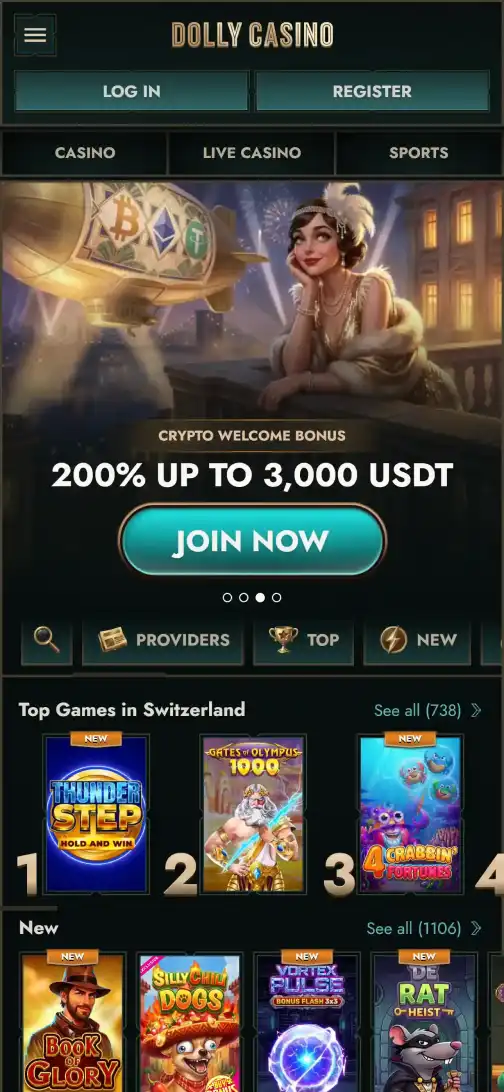
Table of Contents
- Is there a Dolly Casino app for iPhone or Android?
- Browser, shortcut and native app: the practical difference
- How to use Dolly Casino on mobile
- Mobile game browsing
- Live casino on a phone
- Mobile login, account and cashier access
- Should you add Dolly to the home screen?
- What to check before trusting a future native app claim
- Bottom line
Is there a Dolly Casino app for iPhone or Android?
Current evidence supports mobile browser access and a shortcut-style installation path rather than a verified native app distributed through the official Apple or Google stores. Dolly’s own website includes a “Create Shortcut” item in its navigation, and a current third-party app-status source also describes a PWA or web-app route. The website is therefore the verified mobile access method unless Dolly links to an official native app.
This matters because gambling-related search results can contain lookalike apps, unrelated products and APK pages that use a casino name without proving they are published by the operator. A result that merely contains “Dolly Casino” in its title is not enough to establish authenticity. Users should avoid installing an APK or store app unless its publisher and destination can be tied back to Dolly’s current official website.
For most mobile use, the absence of a verified native app does not prevent access. The public Dolly site is responsive, and its current navigation exposes casino, live casino and account functions directly in the browser.
Browser, shortcut and native app: the practical difference
Mobile browser session
You open the AU-facing Dolly website in Safari, Chrome or another supported browser and use the site without installing a separate application.
Home-screen shortcut or PWA-style access
The website is saved to the phone’s home screen so it can be launched from an icon. The underlying service is still web-based, even if it opens in an app-like window.
Native iOS or Android app
A separately packaged application is distributed through an official app store or another verified operator-controlled channel. No such Dolly Casino release was verified in the official Apple or Google stores.
The distinction is useful for security as well as convenience. A browser or shortcut can keep the destination tied to the official Dolly domain. By contrast, downloading a file from an unrelated APK site introduces a separate software source that is not established by the current official evidence.
How to use Dolly Casino on mobile
- Open the current Dolly Casino AU-facing route in your phone browser.
- Use the visible Log in control if you already have an account, or follow the current Register route for a new account.
- After login, use the site’s category navigation for casino games, live casino and account areas.
- If your browser offers a home-screen option, use the official site’s shortcut route rather than downloading an unrelated APK.
- Return to the live site for cashier, account and promotion terms because those details can change independently of the saved shortcut.
The current login page supports an Email or Phone mode and accepts an e-mail or username plus password on the e-mail route. Full registration details are covered in the registration and login guide, which deliberately avoids inventing fields that were not visible in the live form.
Mobile game browsing
The official site currently exposes the same broad casino navigation categories used elsewhere in the Dolly review, including slots, table games, instant games and an All Games route. That makes the browser version more than a simple account shell: it provides a direct path into the playable catalogue from a phone-sized session.
The separate games and pokies guide covers the current catalogue and provider evidence in more detail. On mobile, the practical point is that users can browse the catalogue from the same official web route instead of needing a separate app catalogue. Game availability can still vary by provider and jurisdiction, so the mobile interface should not be treated as proof that every title shown globally is available to every Australian user.
For a specific title, use the live mobile lobby as the final check. A game that appears in a desktop list can be removed, restricted or replaced, and a provider can apply territorial limits independently of the website’s overall mobile access.
Live casino on a phone
Dolly’s current official navigation includes a dedicated Live Casino section and multiple live-game categories. The mobile browser therefore provides a route to live dealer content without requiring a separate native app. The live dealer games guide covers the live lobby and provider-level restrictions rather than duplicating those details here.
Live casino is more sensitive to connection quality than static account pages because it involves continuous video streaming and real-time interaction. Load time, stream resolution and data use depend on the device, browser, network and selected studio. The practical test is whether the chosen live table opens and runs correctly in the current mobile session before committing to play.
If a table does not load, switching to an unofficial app is not the right diagnostic step. First confirm that the title is available in the current lobby, that the browser session is authenticated, and that no provider-level territorial restriction applies.
Mobile login, account and cashier access
The current mobile-friendly site exposes Log in and Register controls, while Dolly’s general public navigation also includes support and account-related entry points. The website therefore remains the main control layer for account access regardless of whether it is opened from a browser tab or saved shortcut.
Banking details should be checked in the authenticated cashier rather than inferred from a mobile page view. The AUD payments guide explains why a payment method mentioned by a review or seen in another market should not be treated as guaranteed for an Australian account. The same principle applies on mobile: the current cashier is the source for what the account can actually use at that moment.
Verification can also interrupt a withdrawal or other account action. If Dolly requests KYC, use the official site and support channels for document submission instructions. Do not send identity documents to an app, messaging account or download site that cannot be tied to the operator.
Should you add Dolly to the home screen?
A shortcut can be useful if you want one-tap access without keeping a browser tab open. It can make the site feel closer to a standalone app while still loading the web service underneath. The benefit is convenience rather than a different account, game catalogue or cashier.
Before saving a shortcut, verify that the browser is on the correct Dolly domain. The shortcut should preserve that destination. If a page asks you to download an APK, install a configuration profile, disable device security or grant unrelated permissions, treat that as a different proposition from the simple web shortcut described by the official site.
A saved shortcut also does not freeze the site at the version you first saw. When launched, it loads current web content, so game lists, promotions, account messages and terms can still change.
What to check before trusting a future native app claim
- Confirm that the official Dolly website links to the exact App Store or Google Play listing.
- Check the publisher name and developer information rather than relying on the icon or casino name alone.
- Do not assume an APK mirror is official because it uses Dolly branding.
- Check whether the app is available in the Australian store region, not only in another country.
- Compare the app’s support and privacy links with the current operator-controlled domain.
If those checks cannot be satisfied, the official browser route remains the lower-ambiguity option. This is especially important for an account that can contain deposits, withdrawals and identity information.
Bottom line
Dolly Casino currently works as a mobile web service, with an official “Create Shortcut” route that can give iPhone and Android users app-like home-screen access. No official native Dolly Casino app was verified in the Apple App Store or Google Play, so the browser/PWA-style route is the verified mobile option.
Use the AU-facing official website, avoid unverified APKs, and treat a future native-app claim as something to recheck rather than an assumption. For account setup, catalogue details and live tables, continue to the dedicated account guide, game library guide and live casino guide.
Published by the Dolly Casino team.